Ideas Strike Anywhere — Record with Apple Watch, Let AI Unpack It on iPhone
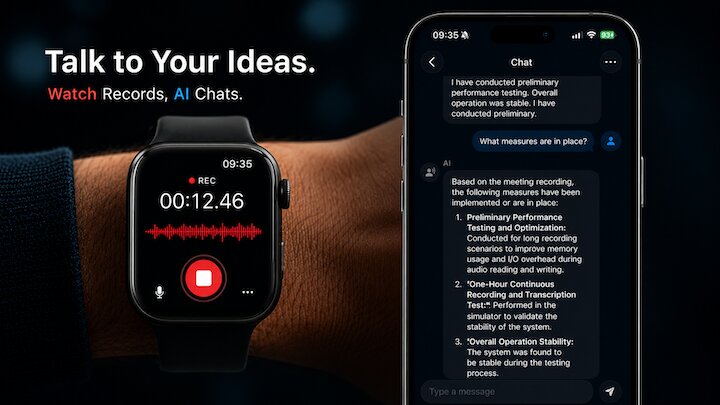
TL;DR: Use your Apple Watch as a hands-free capture device — speak ideas the moment they strike, and AI Local Recorder 2.0 auto-transcribes, summarizes, and makes them searchable on your iPhone. All offline, no typing required.
Great ideas have terrible timing.
They show up on a walk, in the shower, behind the wheel — whenever your iPhone is in your pocket or another room. By the time you reach for it, the thought has already started to fade.
You don't need a bigger phone or a faster typing app. You need to capture the moment in the moment. That's what your Apple Watch is for.
With AI Local Recorder 2.0, your Watch becomes a hands-free capture device. Speak your idea, keep moving, and let your iPhone do the heavy lifting — automatically transcribing, summarizing, and making your recording searchable. All offline.
Scene 1: The Idea on the Walk
You're out for a walk. Your brain connects two unrelated thoughts, and suddenly you see it — a solution, a product angle, a story structure.
If you stop to pull out your phone, the rhythm breaks. The idea slips.
But your Watch is already on your wrist. Lift it. Tap AI Local Recorder. Tap record. Speak. Drop your wrist. Keep walking.
When you get to your desk, open your iPhone. The recording is there, already transcribed. Type in the chat box: "Summarize the key idea." Seconds later, you have a clean paragraph — no need to replay your own rambling voice.
The idea didn't escape. It's searchable, storable, and ready to act on.
Scene 2: On the Road
You're driving. A task pops into your head — something you need to assign to your team tomorrow. Or a meeting point you forgot to raise. Or just a grocery item.
Hands on the wheel. Eyes on the road. No safe way to take a note.
Tap your Watch. One tap to start recording. Speak naturally: "Remind me to follow up with the design team about the mockups." Stop recording.
Arrive at your destination. Check your iPhone — it's there, already transcribed. You can even ask: "What did I record during my drive?" AI Local Recorder pulls it up instantly.
Three seconds of your attention while driving. Zero distraction. Everything captured.
Scene 3: The Subtle Recording
You're in a one-on-one conversation or a quick team standup. Everyone's in flow. You want to record the key points, but pulling out your iPhone and tapping a recording app is visibly awkward — it changes the dynamic.
Instead, a subtle tap on your Watch starts recording. Nobody notices.
After the meeting, the audio is on your iPhone. Ask AI Local Recorder: "What were the action items?" "Who's responsible for the marketing timeline?" "Summarize the decisions we made." Instant answers.
You stayed present in the conversation. The recording handled the memory.
Scene 4: Privacy, As Always
Every recording you make on your Watch lives on your devices only. Audio syncs through iCloud (Apple's end-to-end encrypted infrastructure). Transcription and AI processing happen entirely on your iPhone's local neural engine — no servers, no uploads, no third parties.
It's the same privacy promise AI Local Recorder has always kept. Your voice, your data, your device.
How It Works
- Open AI Local Recorder on your Apple Watch. Tap record.
- Your Watch records in the background — switch apps or lower your wrist. Recording continues.
- Stop when you're done. The audio syncs to your iPhone via iCloud.
- AI Local Recorder transcribes your recording offline and makes it searchable.
- Ask questions, get summaries, or browse the full transcript.
No setup. No accounts. No learning curve.
If you already have AI Local Recorder on iPhone, the Watch app is included — open it once to pair, and you're ready.
Sometimes the best tool isn't in your pocket. It's already on your wrist.
AI Local Recorder on the App Store. Apple Watch support in version 2.0.
🎯 Try It Now
AI Local Recorder — Record meetings, lectures, and ideas. AI transcribes offline. Chat with your recordings. Zero uploads, zero subscriptions.
