How to Use Offline Transcription to Ace Your Classes
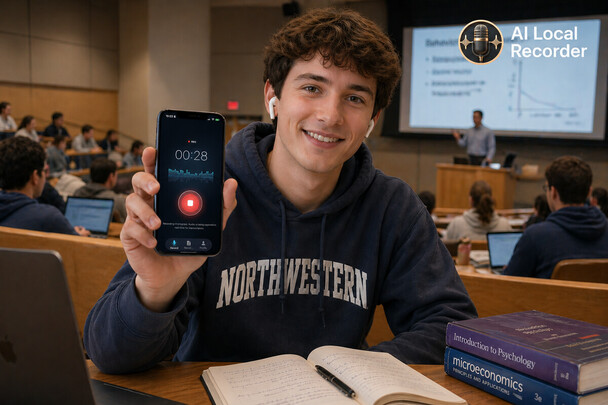
How to Use Offline Transcription to Ace Your Classes
TL;DR: Taking notes by hand makes you miss half the lecture. Record it instead — offline transcription turns your 90-minute lecture into searchable text you can read, search, and summarize, without internet and without uploading anything. Record → transcribe → review beats frantic note-taking.
You sit through a 90-minute lecture, take notes frantically, and still miss half of what the professor said. Sound familiar?
Most students rely on note-taking apps or paper notebooks. The problem is, when you're busy writing, you're not really listening. You're transcribing, not understanding.
What if you could just record the lecture — and let AI handle the notes?
Here's how offline transcription changes the game for students.
The Problem with Traditional Note-Taking
You can't listen and write at the same time.
Research shows that students who type notes verbatim retain less than those who listen and summarize. But summarizing requires mental bandwidth — bandwidth you're spending on writing.
Recording solves this. When you record a lecture, you free up your brain to actually engage with the material. Ask questions. Make connections. Nod along. Listen properly.
The recording captures everything. Later, offline transcription turns that audio into text. And AI lets you ask questions about the content without listening to the entire recording again.
Step 1: Record the Lecture
Open AI Local Recorder, tap record, and set your iPhone aside. The app records at 16kHz — clear enough to capture the professor's voice even in a large lecture hall.
Pro tip: Place your phone near the front of your desk. The built-in microphone works well for lectures in standard classrooms.
Step 2: Transcribe Offline
After class, open the recording and tap "Transcribe." AI Local Recorder processes everything on-device. No uploads, no waiting for Wi-Fi.
Supported languages for transcription:
- English
- Chinese
- Japanese
- Korean
- Spanish
- German
- French
- Arabic
Whether your lecture is in English, Mandarin, or Spanish, the transcription handles it. If your professor switches languages (common in international programs), the app adapts.
The transcription happens in minutes, not hours. You'll have the full text of the lecture before you leave campus.
Step 3: Chat with Your Lecture
Here's where AI Local Recorder really shines for students.
Instead of scrolling through pages of transcript, you can just ask:
- "What were the three main theories discussed?"
- "Summarize the first 20 minutes."
- "What did the professor say about the exam format?"
- "List all the key dates mentioned."
AI reads the transcript and answers in seconds. It's like having a teaching assistant who's listened to every lecture you've ever recorded.
Real student use case:
"I record my biochem lectures and after class I ask 'What are the key enzyme pathways?' AI Local Recorder pulls the answer from the transcript. I don't need to rewatch 90 minutes of video." — Pre-med student, University of California
Step 4: Search Across All Your Lectures
Exam season hits. You need to find that one concept from week 3. With paper notes, you'd flip through notebooks. With cloud apps, you'd hope the server still has your file.
With AI Local Recorder, all your recordings are searchable by keyword. Every recording, every transcript, instantly searchable.
Search for "mitochondria" and find every lecture where it was mentioned. The full context appears in the transcript. No re-listening required.
Why Offline Matters for Students
1. No Wi-Fi dependency
Not every lecture hall has reliable Wi-Fi. Some classrooms are in basements or older buildings where cellular data doesn't reach. Offline recording and transcription mean you never lose a lecture due to connectivity issues.
2. Privacy for sensitive courses
Some courses cover sensitive topics — patient interviews in medical school, confidential business cases, personal research interviews. Uploading recordings to the cloud for transcription creates a privacy risk. Offline keeps everything on your device.
3. No subscription fees
Students already pay for textbooks, tuition, and software licenses. A subscription-based transcription service adds $8–$17 per month. AI Local Recorder is $4.99 one-time. No recurring costs.
4. Works with study groups
Export the transcript as text and share it with classmates. Everyone gets the same notes, no one misses key points.
Sample Student Workflow
| Time | Action |
|---|---|
| Before class | Open AI Local Recorder, tap record, place phone on desk |
| During class | Listen actively, participate, ask questions |
| After class | Tap "Transcribe" — get full lecture text in minutes |
| Evening review | Ask AI: "Summarize today's key concepts" |
| Exam prep | Search across all recordings for specific topics |
| Study group | Export transcript text and share |
Comparison: Recording Methods for Students
| Method | Offline? | AI Search? | Chat with Content? | Cost |
|---|---|---|---|---|
| Paper notebook | ✅ Always | ❌ No | ❌ No | Low |
| Laptop notes | ✅ Yes | ⚠️ Limited | ❌ No | Varies |
| Cloud recorder (Otter, Notta) | ❌ Internet needed | ✅ Yes | ⚠️ Basic | $8–$17/mo |
| AI Local Recorder | ✅ Full | ✅ Full | ✅ Full | $4.99 once |
Tips for Best Results
Position your phone well. Place it where the professor's voice is clearest. If you're in a large lecture hall, the front row or tiered seating near the front works best.
Review the transcript early. Transcription is best when done shortly after recording. The content is fresh in your mind, and you can flag anything the AI might have missed.
Use chat for exam prep. Instead of re-listening to hours of lectures, ask targeted questions. "What did the professor say about [topic] across all lectures?" The AI searches every recording.
Combine with your own notes. Record the lecture for completeness, but still jot down a few bullet points during class — key terms, questions, things to look up. The recording fills in the gaps.
The Bottom Line
Recording lectures with offline transcription isn't about working less — it's about working smarter. You free up mental energy during class, capture every detail, and access the content through natural conversation with AI.
No Wi-Fi needed. No subscription. No privacy concerns. Just you, your iPhone, and your lectures.
Ready to transform how you study? Try AI Local Recorder on the App Store. Record once. Ask anything. All offline.
